Use cases & how it works

One call, everyone moves

This page shows how ACT is used day to day in a hospital – who does what, what happens minute by minute, and how outcomes are reviewed.

Who does what

Three roles, no overlapping duties

The app adapts automatically to the account type. Each role only sees the menus that match its job.

User

Ward nurses, midwives, BLS-trained staff
  • Start voice-guided BLS
  • Activate Code Blue with location & bed
  • CPR with metronome & AED guidance
  • Hand over when the team arrives
  • Does not receive Code Blue alarms
  • Cannot enter the team code room (ACLS)

Code Blue Team

On-duty doctors, core team nurses, anaesthesia
  • Receive full-screen alarm & siren
  • Respond to calls & choose a role
  • Run ACLS cycles, shocks & drugs
  • ROSC, vitals, End Code & summary
  • Cannot call Code Blue – calls come from Users
  • Does not run the User BLS flow

Coordinator (PIC)

Code Blue PIC, head nurses, quality committee
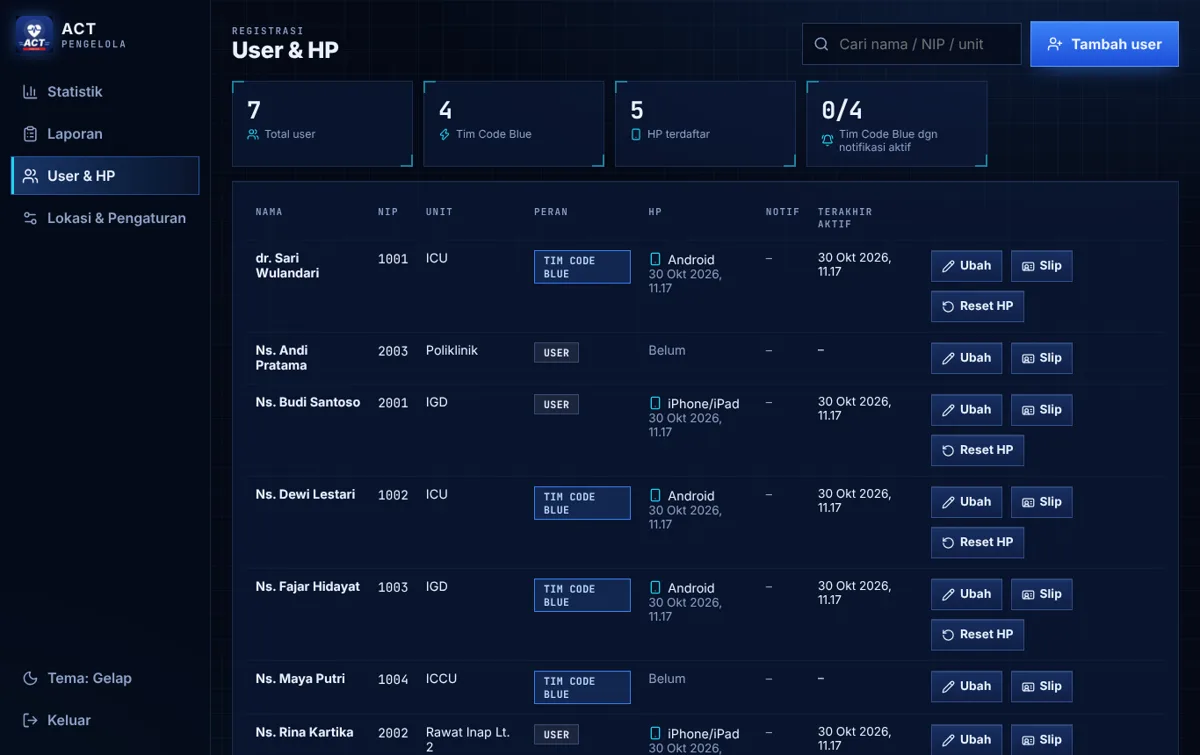
  • Register users & devices, send PIN slips
  • Set hospital name, Code Blue extension & locations
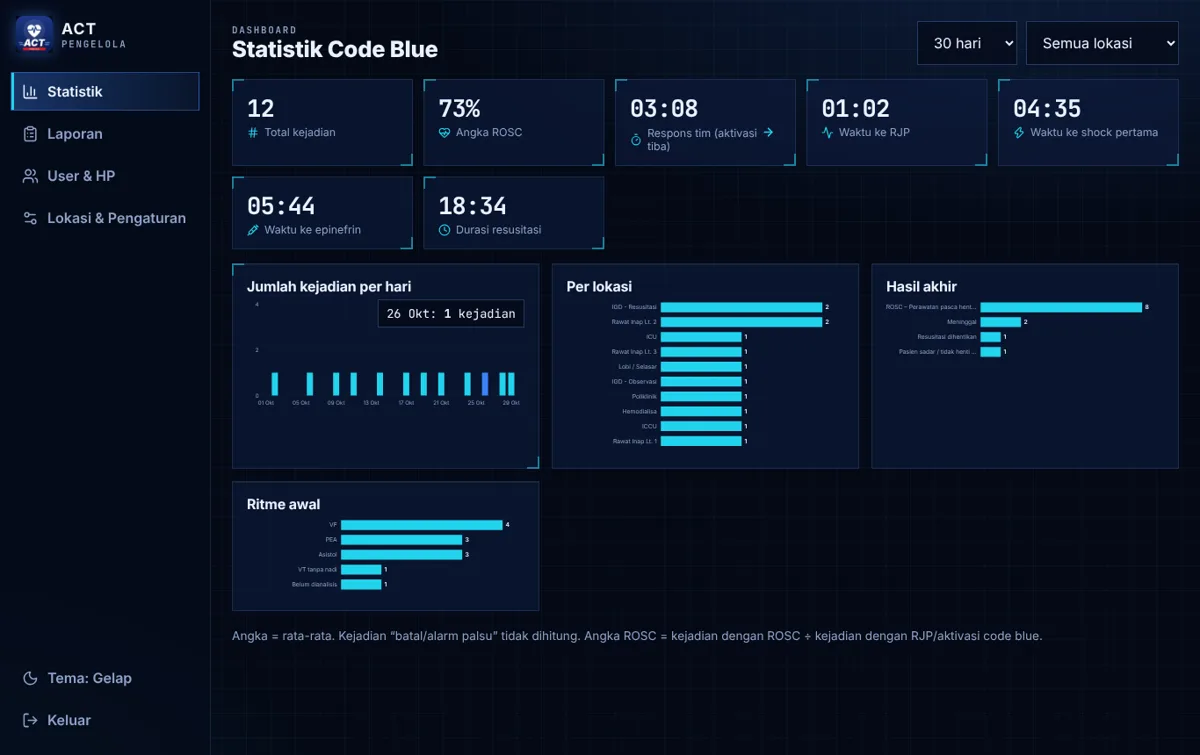
  • Monitor statistics & response times
  • Print & export reports
  • Not part of the resuscitation flow on phones
Minute by minute

Example of a single Code Blue event

Times are illustrative only – the app records the actual time of every action.

  1. 00:00
    USERUnresponsive patient found

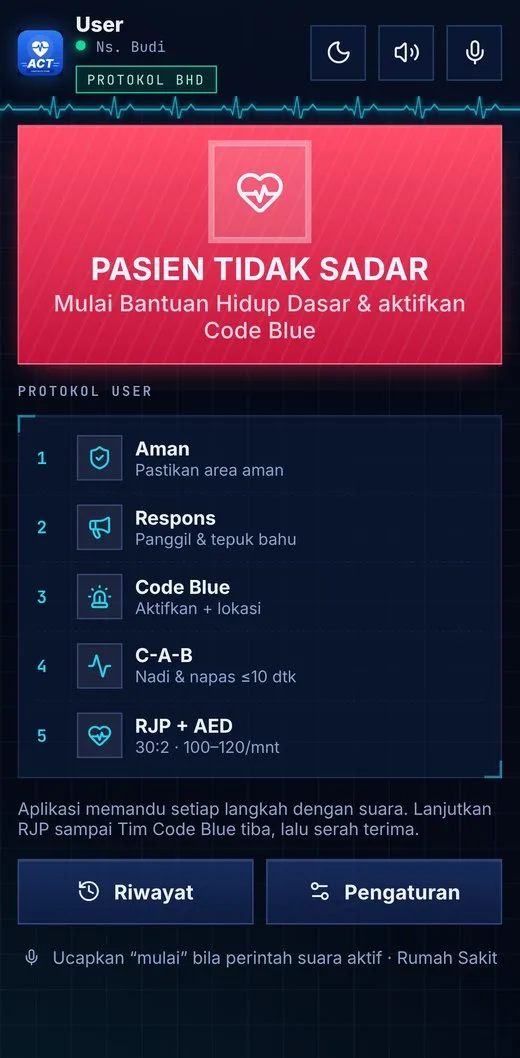
    The nurse opens ACT and taps PATIENT UNRESPONSIVE (or says “start”). The event clock starts.

  2. 00:10
    USERScene safety & response check

    Voice guidance: make it safe, call the patient’s name, tap the shoulders. Answer with big buttons or by voice.

  3. 00:20
    USERActivate Code Blue

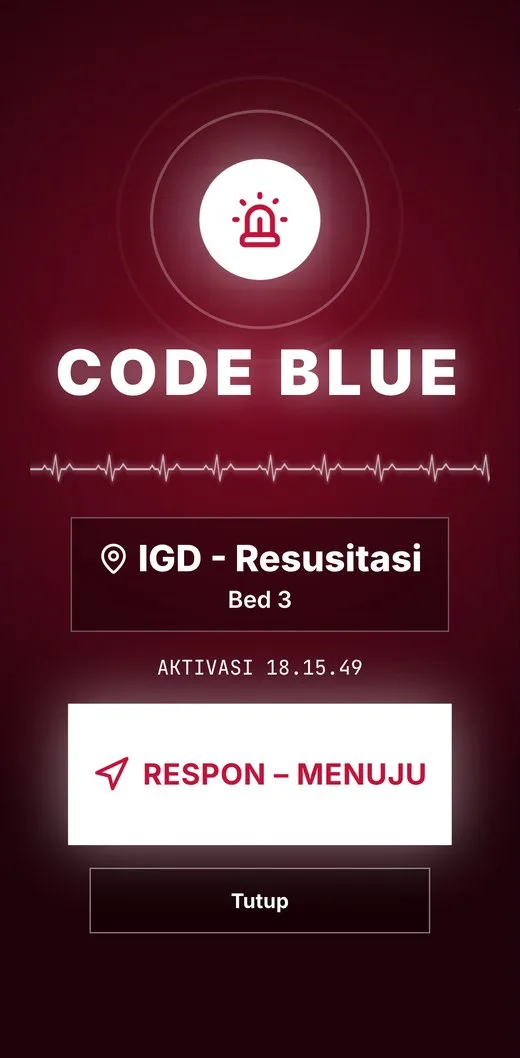
    Pick the location and bed, then one tap on ACTIVATE CODE BLUE. The app reminds you to ask for an AED.

  4. 00:21
    SYSTEMEvery team phone rings

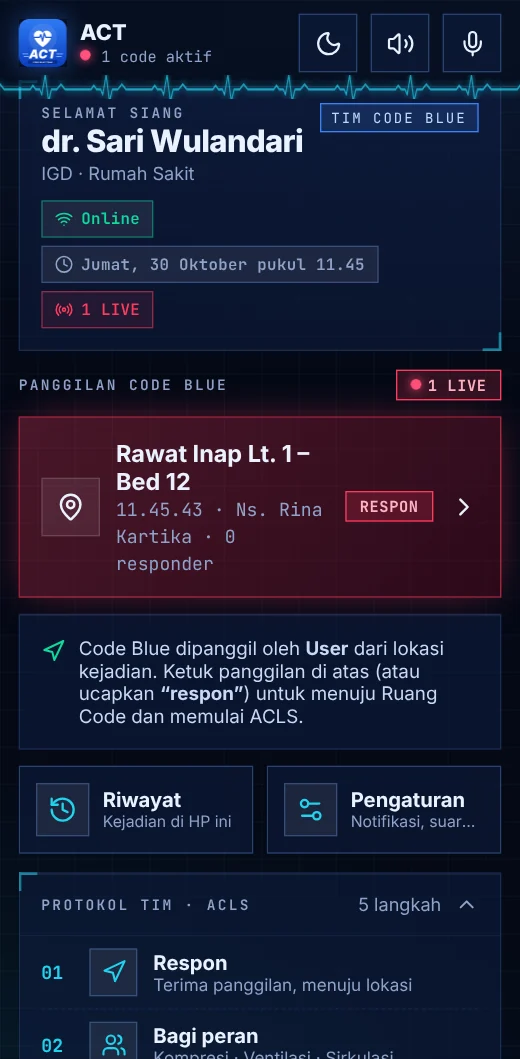
    A full-screen alarm and siren appear on Code Blue Team phones, and the location is spoken. No more phone trees.

  5. 00:30
    USERCheck pulse & breathing, start CPR

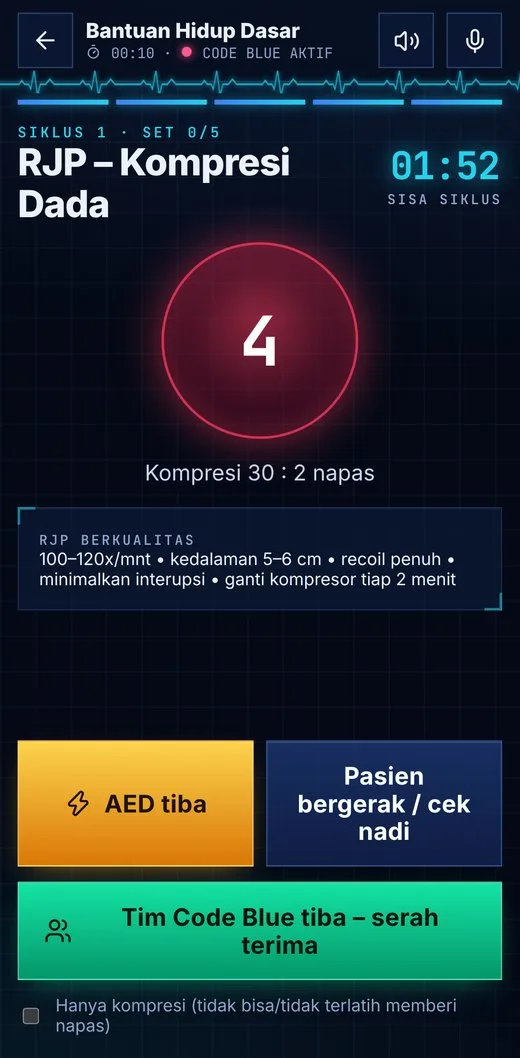
    10-second countdown, then 30:2 CPR with a 100–120/min metronome. When the AED arrives, pad & shock guidance is ready.

  6. 00:40
    CODE BLUE TEAMTeam responds & assigns roles

    Team members tap RESPOND and choose a role: compressions, airway, or circulation/documentation.

  7. ±03:00
    CODE BLUE TEAMHandover & ACLS

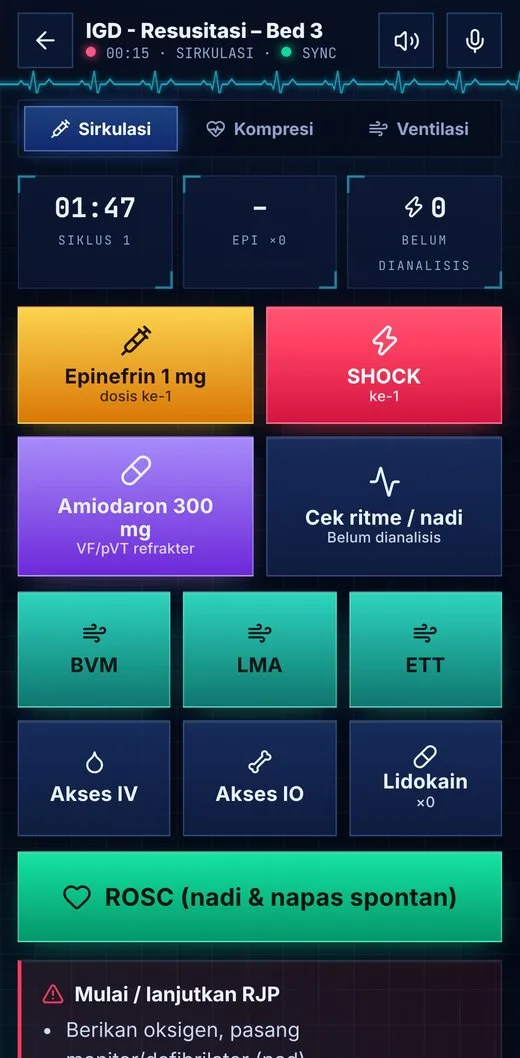
    The User taps “handover”. The team runs 2-minute cycles: rhythm checks, shocks, epinephrine, amiodarone – with timed prompts.

  8. End
    CODE BLUE TEAMROSC or End Code

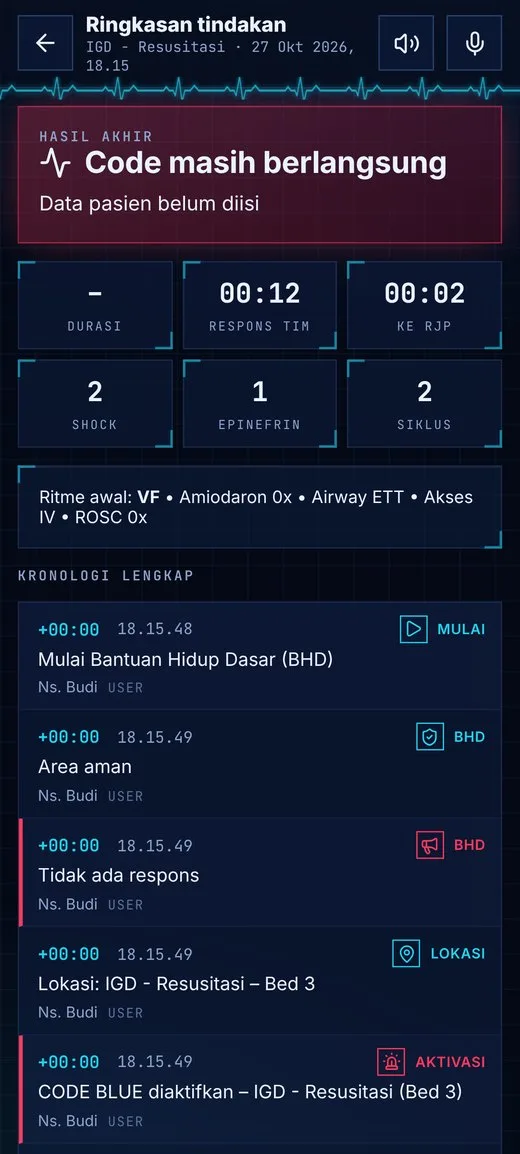
    Post-ROSC vitals are recorded, or resuscitation is stopped with an outcome. The summary & timeline are built automatically.

  9. Day +1
    COORDINATORReview in the dashboard

    The event appears in reports: response time, time to CPR, number of shocks & drugs. Print-ready for review meetings.

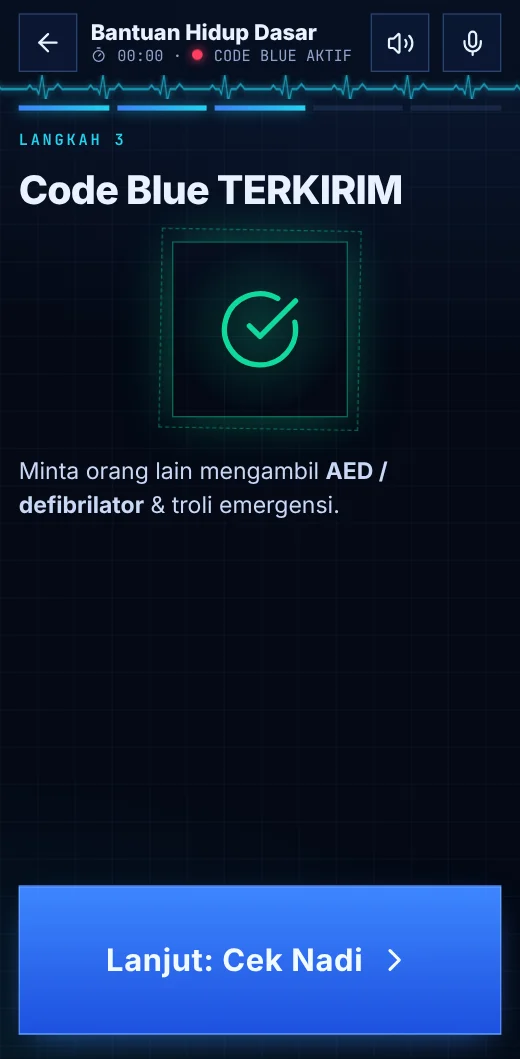
User – Code Blue sent
UserCode Blue sent
Code Blue Team – Full-screen alarm
Code Blue TeamFull-screen alarm
Code Blue Team – ACLS cycles
Code Blue TeamACLS cycles
Everyone – Automatic timeline
EveryoneAutomatic timeline
Use cases

Real situations hospitals face

01 · Inpatient ward · night shift

Night nurse finds an unresponsive patient

Situation. At 2 a.m., during rounds, a nurse finds a patient not breathing normally. Few colleagues are on the ward.

With ACT
  • Big buttons + voice guidance – no need to remember the sequence
  • Code Blue activation: “Inpatient Fl. 1 – Bed 12”
  • Metronome & 30:2 count keep CPR quality high
  • Hands busy? Answer with voice commands

The team knows the exact location instantly; arrest-to-CPR time is recorded.

02 · Emergency department · resus bay

Cardiac arrest with VF rhythm

Situation. An ED patient collapses during observation. The monitor shows ventricular fibrillation.

With ACT
  • The ED nurse (User) activates Code Blue
  • Doctors & team nurses respond and pick roles
  • Rhythm check “VF”defibrillation & energy guidance
  • Epinephrine (3–5 min) and amiodarone reminders per algorithm

No missed doses or drug times; a timeline ready for the medical record.

03 · Public areas · lobby, cafeteria, parking

A visitor collapses outside clinical areas

Situation. A patient’s relative suddenly collapses in the lobby. The nearest staff member is BLS-trained.

With ACT
  • The staff member (User) selects the public-area location
  • The app reminds them to fetch the nearest AED
  • AED guidance: attach pads, analyse, shock
  • The Code Blue Team receives the same location at once

Events outside clinical areas are coordinated just like on the ward.

04 · Basement, radiology, lifts

Weak signal or no internet

Situation. The event happens in an area with an unstable network.

With ACT
  • All BLS guidance works without internet
  • The call is queued and sent automatically when signal returns
  • A Code Blue extension call button is available as backup
  • Action records stay on the phone – nothing is lost

Response does not depend on signal; data stays complete.

05 · Any ward

Pulse present / patient improving

Situation. During the C-A-B check, a pulse is found but the patient needs monitoring.

With ACT
  • Choose “pulse present”monitoring mode
  • The app prompts periodic re-checks
  • If the patient deteriorates, one tap activates Code Blue
  • If already called, the team still comes to assess

“Near-arrest” events are documented too.

06 · After resuscitation

ROSC and post–cardiac arrest care

Situation. After several cycles, a pulse returns.

With ACT
  • Tap ROSC, enter vitals (BP, HR, SpO₂, RR, temperature)
  • Post–cardiac arrest care checklist
  • If re-arrest occurs, ACLS cycles resume immediately
  • End Code with outcome & patient details

A complete summary for handover to the ICU.

07 · Quality committee · monthly meeting

Evaluating Code Blue performance

Situation. Management wants to know how fast the team responds and where events happen most.

With ACT
  • Statistics: total events, ROSC rate, team response time
  • Time to CPR, first shock & epinephrine
  • Charts by location, outcome, initial rhythm
  • Per-event reports: print or export to CSV/Excel

Review and audit material without manual tallying.

08 · HR · coordinator

New nurses, rotations, or a lost phone

Situation. New nurses join, some move units, and a phone is reported lost.

With ACT
  • The coordinator adds users & chooses User / Code Blue Team
  • PIN slips are sent via WhatsApp or printed
  • Lost phone“Reset device”, account re-registered on the new phone
  • One user is active on only one phone

Access stays controlled and easy to manage.

How to use

Quick guide for each role

  1. 01
    Install once

    Open the ACT link from your coordinator, choose “Add to Home Screen”, enter your staff ID & PIN from the slip.

  2. 02
    In an emergency

    Tap PATIENT UNRESPONSIVE or say “start”. If the phone is locked, use the EMERGENCY button.

  3. 03
    Follow the voice

    Safetyresponseactivate Code Blue (choose location & bed)check pulse & breathing.

  4. 04
    CPR & AED

    Follow the 30:2 metronome. When the AED arrives, follow the pad and shock guidance.

  5. 05
    Handover

    When the team arrives, tap “handover”. The summary is saved in History.

User home
User home
Code Blue sent
Code Blue sent
CPR with metronome
CPR with metronome
  1. 01
    Install & enable notifications

    Required for the team: allow notifications so the phone rings on every Code Blue.

  2. 02
    When the alarm sounds

    Tap RESPOND. Location & bed are shown in large type.

  3. 03
    Choose a role

    Compressions, airway, or circulation/documentation – as agreed on scene.

  4. 04
    Run the cycles

    2-minute timer, rhythm & pulse checks, shocks, epinephrine, amiodarone, H’s & T’s – all logged.

  5. 05
    ROSC / End Code

    Enter vitals or end the resuscitation. Summary & timeline appear automatically.

Incoming calls
Incoming calls
Full-screen alarm
Full-screen alarm
Code room
Code room
  1. 01
    Sign in to the dashboard

    Open the Admin page, enter the admin PIN, and change the default PIN right away.

  2. 02
    Configure the hospital

    Set the hospital name, Code Blue extension, and the list of locations/wards.

  3. 03
    Register the team

    Add users, choose User or Code Blue Team, and send PIN slips via WhatsApp.

  4. 04
    Monitor statistics

    Review response time, time to CPR & ROSC rate by period and location.

  5. 05
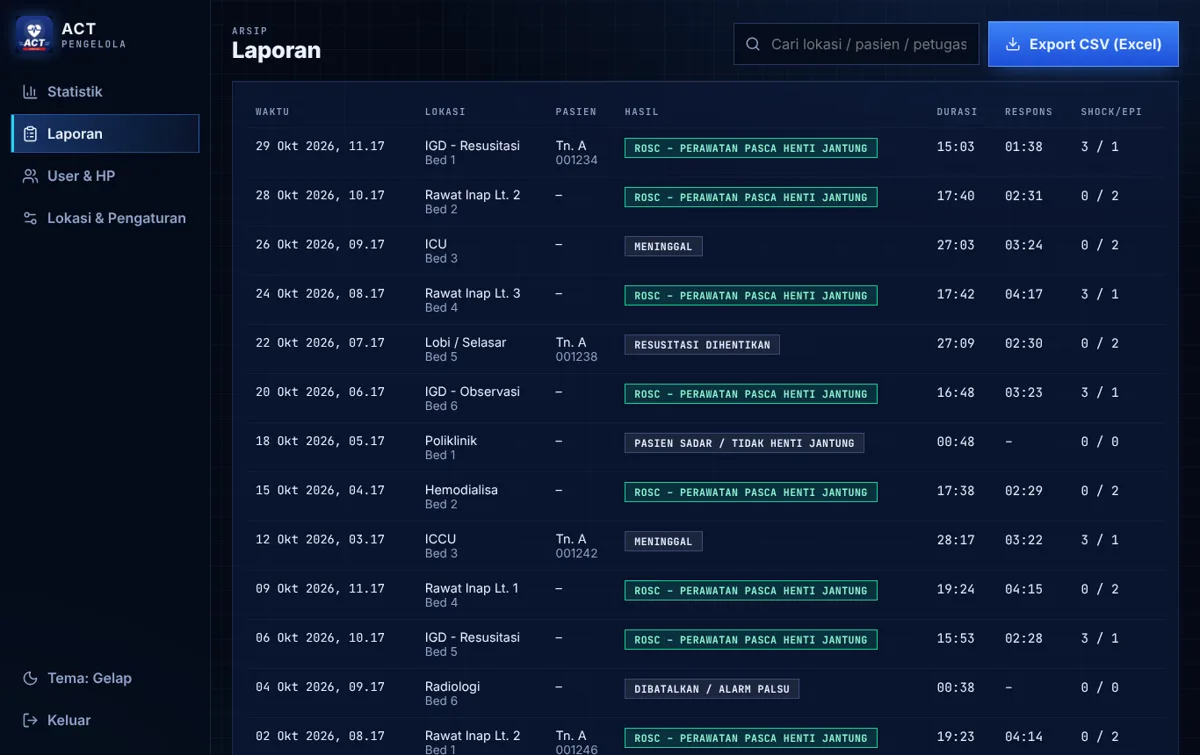
    Reports

    Open each event with its timeline; print or export to CSV/Excel.

ACT Pengelola
Users & devices
Users & devices
ACT Pengelola
Statistics
Statistics
ACT Pengelola
Reports
Reports
For the hospital

What management gains

Measurable response

Activation, team arrival, CPR, shock, and drug times are recorded automatically – not estimated.

Algorithm-aligned

BLS & ACLS steps follow AHA 2020 and can be adapted to hospital SOPs.

Complete documentation

Second-by-second timeline with staff names, ready to print for the medical record.

Quality improvement data

Monthly statistics by location for committee meetings, refresher training, and internal audits.

FAQ

Frequently asked questions

Do we need to install the app from Play Store / App Store?

No. ACT is a web app (PWA): open it from a link and add it to the home screen. It runs on Android, iPhone, tablets, and PCs.

Why can’t the Code Blue Team call a Code Blue?

To keep the flow clear: the User at the scene calls, the Code Blue Team responds. If a team member finds a patient, the call is made by the ward nurse (User) or via the hospital’s Code Blue extension.

Do Users receive alarms too?

No. Full-screen alarms go only to Code Blue Team phones, so other nurses are not disturbed.

What if there is no internet?

BLS guidance keeps working. Calls and records are stored on the phone and sent automatically when the network returns. A Code Blue extension call button is available as backup.

Do notifications work on iPhone?

Yes, on iOS 16.4 or later, once ACT is added to the home screen and notification permission is granted.

What if a phone is lost or a nurse changes phones?

The coordinator taps “Reset device” on that account, then the nurse registers again on the new phone with their staff ID & PIN. Each account is active on one phone only.

Does ACT replace the hospital’s Code Blue SOP?

No. ACT is a guidance and documentation aid; clinical decisions remain with the medical team. Locations and workflow can be adapted to your SOPs.

How long does rollout take?

Usually a few days: configure locations, register users, install on phones, then run a megacode simulation with the team.

Interested in ACT?

Let’s discuss your hospital’s needs

We help align the protocol with your hospital SOPs, train your teams, and evaluate Code Blue performance.
  • App demo for ED/ICU teams
  • Location & protocol customisation
  • Implementation support
WhatsApp Tim Pengembang ACT